




About Indian Truck Simulator 3D
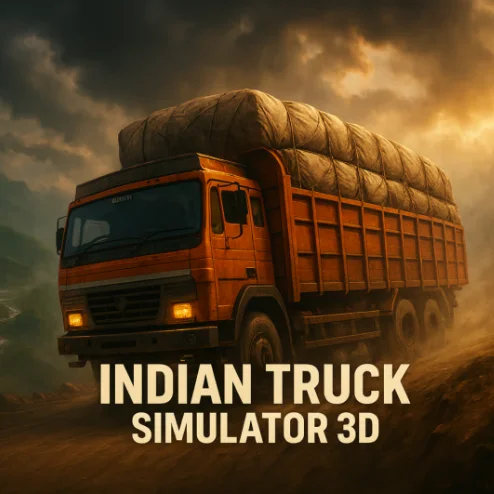
Indian Truck Simulator 3D is a browser-based cargo driving game that puts you in control of a heavy truck on remote and dangerous roads. Each mission requires you to collect a load, transport it across difficult terrain, and deliver it without losing the cargo.
The challenge comes from the truck’s weight and the condition of the road. Narrow bends, steep slopes, uneven surfaces, and other vehicles leave little room for careless driving. Accelerating too aggressively can destabilize the load, while late braking may send the truck off the route.
The game includes summer and winter environments. Dry mountain trails already demand precise control, but snow and icy surfaces make braking and steering even less predictable.
Indian Truck Simulator 3D runs directly in a desktop browser using WebGL. It is designed for keyboard play and requires no separate installation.
How to Play Indian Truck Simulator 3D
Select an available truck or color option and begin the first unlocked mission. Follow the route to the loading area before attempting the main delivery.
A complete mission usually involves these steps:
- Drive to the marked cargo pickup point.
- Position the truck correctly for loading.
- Wait until the cargo has been placed on the vehicle.
- Follow the route toward the destination.
- Reduce speed before hills, bends, and rough surfaces.
- Avoid collisions with other trucks and roadside obstacles.
- Reach the unloading point with the cargo intact.
- Unload the goods and park in the indicated finishing area.
If cargo falls from the vehicle, the mission may fail. Protecting the load is therefore more important than finishing the journey at maximum speed.
Controls
Use the following desktop controls:
Use the handbrake carefully. It can help hold the truck in place, but activating it abruptly at speed may make the vehicle or cargo unstable.
Cargo, Routes, Weather, and Truck Physics
Every delivery combines several hazards that must be managed at the same time.
The cargo changes the truck’s balance. A loaded vehicle responds more slowly and is more likely to tip or lose items when driven across an angled surface.
Weather should also affect your approach. A technique that works on a dry summer route may be too aggressive for a winter road with reduced grip.
Beginner Tips for Indian Truck Simulator 3D
Test the brakes before reaching the first dangerous section. Knowing the stopping distance helps you plan each corner.
Keep the truck moving smoothly. Sudden acceleration and steering are the most common causes of lost cargo.
Brake while traveling straight. Heavy braking during a turn can destabilize the truck.
Watch the road ahead rather than focusing only on the vehicle. Early observation gives you more time to prepare for hazards.
Use a wider camera angle on narrow routes. Better visibility makes it easier to judge the truck’s position relative to the edge.
Slow down when passing traffic. The road may not provide enough space for two large vehicles at full speed.
Approach unloading and parking zones carefully. A successful journey can still be ruined by rushing the final maneuver.
Advanced Indian Truck Simulator 3D Strategy
Build momentum before a steep climb, but reduce power if the front of the truck begins to lift or the cargo starts moving.
Take wide corners with the vehicle’s length in mind. Begin steering at the correct moment and allow the rear section enough room to follow.
Use progressive braking on descents. Apply the brake in short, controlled stages instead of waiting until the truck reaches excessive speed.
Read the terrain surface. Ruts, rocks, slopes, and road edges can tilt the cargo bed even when the truck is moving slowly.
Switch camera views for specific tasks. A distant view helps with road positioning, while a closer perspective may be useful during loading and parking.
Memorize difficult sections after a failed run. Route knowledge lets you reduce speed before the hazard becomes visible.
Treat winter missions as separate challenges. Use gentler steering, begin braking earlier, and maintain a larger safety margin than on dry roads.
FAQ
Is Indian Truck Simulator 3D free to play?
Yes. You can play the browser version online for free.
Does Indian Truck Simulator 3D require a download?
No. It runs directly in a compatible desktop browser through WebGL.
What is the main objective?
Pick up cargo, transport it across a dangerous route, unload it at the destination, and complete the required parking maneuver.
What happens if cargo falls from the truck?
Losing required cargo can cause the level to fail, forcing you to restart the mission.
Does the game include different weather conditions?
Yes. The game features summer and winter environments that affect the appearance and difficulty of the roads.
How do I change the camera?
Press C to cycle through the available camera views.
Why does the truck keep tipping over?
You may be cornering too quickly, driving across an angled surface, or making sudden steering corrections with a heavy load.
How do I drive safely on snowy roads?
Reduce your speed, steer gradually, and begin braking earlier because winter surfaces provide less traction.
Can I play Indian Truck Simulator 3D on a computer?
Yes. The web edition is designed primarily for desktop and laptop browsers with keyboard controls.
Who developed Indian Truck Simulator 3D?
The browser game is commonly credited to RoyaleGamers and is also listed on some platforms under Gamebiz.
More Games Like This
Car Simulator Arena
Edy’s Car Simulator
Flying Car Simulator

Grand Vegas Simulator
Highway Bike Simulator

Ultimate Offroad Simulator
Cars Simulator
Real Construction Excavator Simulator

Idle Restaurants Tycoon

Idle Idle GameDev

Dalgona Candy Honeycomb Cookie
