













About Edy’s Car Simulator
Edy’s Car Simulator is a free-roaming browser game designed as both a driving sandbox and a vehicle-physics laboratory. There are no races, compulsory missions, or countdown timers. You choose a vehicle and decide whether to cruise through the city, practice drifting, perform jumps, or conduct controlled damage tests.
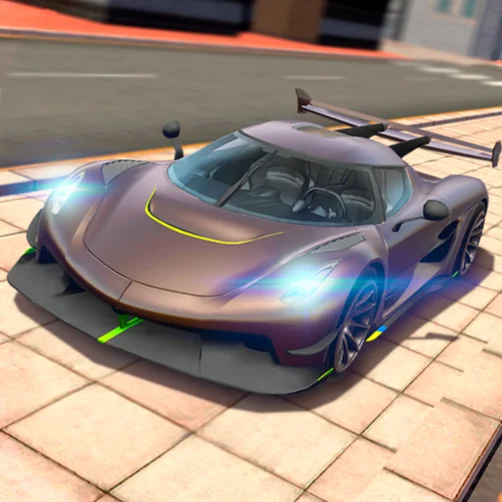
Five vehicles are available: two sports cars, two pickup trucks, and a bus. You can switch between them instantly, repair damage without changing position, or reset the vehicle after a rollover.
Special tools set this simulator apart from a typical open-world driving game. Slow motion lets you examine crashes and landings, telemetry displays technical information, and a movable gray stone can be loaded onto a pickup to test how extra weight changes its behavior.
How to Play Edy’s Car Simulator
- Select one of the five available vehicles and begin exploring the city. Practice normal acceleration, braking, and steering before experimenting with handbrake turns or high-speed impacts.
- Visit the test-track area when you want a more demanding driving environment. Its slopes, uneven surfaces, ramps, and sand provide opportunities to evaluate suspension, grip, acceleration, and vehicle stability.
- Use the sports cars for speed and cornering tests, the pickups for cargo experiments, and the bus when you want to observe how a larger vehicle handles. Press E to move the gray testing stone, then position it in a pickup bed for a load test.
- Damage does not have to end your session. Press R to repair the active vehicle in place, or use Enter if it has overturned and needs to be reset.
Controls
These inputs make a desktop or laptop keyboard the most suitable control method.
Vehicles, Damage, Telemetry, and Testing Tools
Edy’s Car Simulator provides several vehicle types and diagnostic features for creating your own experiments.
Unlike a progression-based game, every tool exists for experimentation. Your goal is to understand and enjoy the driving model rather than unlock content.
Beginner Tips for Edy’s Car Simulator
- Start with a sports car on paved city roads to learn the basic handling.
- Change the camera until you find a view that clearly shows the vehicle’s position.
- Brake before turning rather than using the handbrake for every corner.
- Tap the handbrake briefly when practicing a drift.
- Use R to repair damage while preserving your current testing location.
- Press Enter if the car becomes trapped or overturns.
- Learn the normal behavior of a pickup before adding the gray stone.
- Approach the test track slowly during your first visit.
- Activate telemetry only when you want technical feedback.
- Use slow motion after learning the controls so it does not disrupt your timing.
Advanced Edy’s Car Simulator Experiments
Create repeatable tests instead of driving randomly when you want to compare vehicles. Choose a fixed starting point, use the same route, and perform the maneuver at a similar speed. Repeat it with each vehicle to identify meaningful differences in acceleration, grip, stability, and braking.
For load testing, drive an empty pickup through the test track first. Reset the scene, place the gray stone in the truck bed, and repeat the same route. Observe how the additional mass affects cornering, suspension movement, hill climbing, and stopping distance.
Use slow motion just before a jump or collision. Watch how the suspension compresses, which part of the vehicle contacts the ground first, and how the body reacts to the impact. Repair the damage and adjust the approach speed for the next attempt.
Telemetry is most useful when comparing controlled runs. Change its display mode with Shift + Y and monitor the information relevant to your experiment. Avoid making several changes simultaneously, as this makes it difficult to identify which factor produced the result.
When practicing drifts, begin the turn normally, apply the handbrake for a short moment, and counter-steer as the rear moves outward. Repeat the same corner until you can maintain the slide without spinning or striking the curb.
FAQ
Can I play Edy’s Car Simulator online?
Yes. The game runs directly in a compatible desktop web browser without requiring a separate installation.
How many vehicles are available?
There are five vehicles: two sports cars, two pickup trucks, and one bus.
Does Edy’s Car Simulator have missions or races?
No. It is an open driving sandbox focused on exploration, physics experiments, crashes, and vehicle testing.
How do I change vehicles?
Use Tab, Page Up, or Page Down to cycle through the vehicles. You can also press a number from 1 to 5 to select one directly.
How do I repair a damaged car?
Press R. The vehicle will be repaired without requiring you to abandon the current location.
What is the gray stone used for?
It is a movable test object. Press E to move it and use a pickup truck to examine how an added load changes vehicle behavior.
How do I activate slow motion?
Press T to turn slow-motion mode on or off.
What does telemetry show?
Telemetry displays technical information about the active vehicle. Press Y to show or hide it and Shift + Y to change its mode.
What is the difference between repair and reset?
Repair restores vehicle damage while maintaining the current situation. Reset returns a stuck or overturned vehicle to a usable position.
Can I pause the vehicles without pausing the camera?
Yes. Press P to freeze vehicle movement while continuing to use the camera and vehicle-selection tools.
How do I reset the entire scene?
Use Shift + Esc or Shift + R to restore the full testing environment.
What is the best way to play Edy’s Car Simulator?
Use a desktop or laptop browser with a keyboard, as the simulator relies on numerous keys for vehicle selection, repairs, telemetry, slow motion, and scene control.
More Games Like This

Real Simulator Monster Truck

Flying Car Simulator

Grand Vegas Simulator

Highway Bike Simulator

Indian Truck Simulator

Ultimate Offroad Simulator

Indian Truck Simulator 3D

Real Construction Excavator Simulator

Idle Restaurants Tycoon

Idle Idle GameDev

Dalgona Candy Honeycomb Cookie
