




About 3D Car Simulator
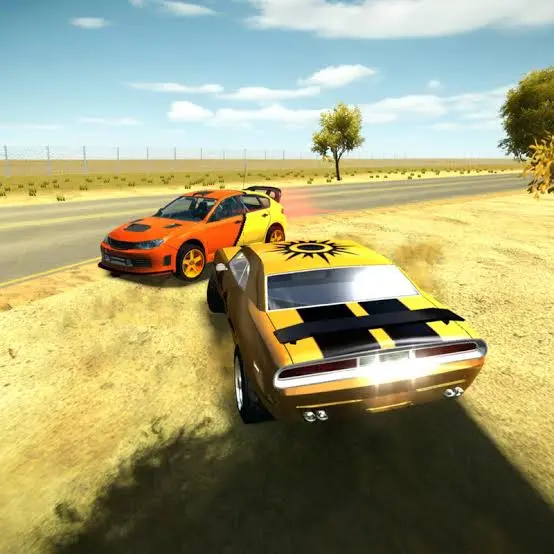
3D Car Simulator is a free-roaming browser game developed by Faramel Games. It offers a straightforward driving experience with three vehicles, three large maps, multiple camera views, and no mandatory races or missions.
You can drive a responsive rally car, patrol the streets in a police cruiser, or explore at a more relaxed pace in an old-fashioned car. Each vehicle provides a different impression of speed, weight, and handling, and you can switch between them instantly during a session.
The open maps feature city streets, off-road terrain, hills, and wide spaces where you can practice cornering, drift with the handbrake, or simply cruise without a timer. The absence of structured objectives makes the game suitable for short driving sessions as well as extended exploration.
How to Play 3D Car Simulator
- Select one of the three maps and begin exploring with the available vehicle. Use the accelerator carefully at first so you can learn the road layout and understand how the car responds to steering.
- Press Shift whenever you want to switch between the rally, police, and classic cars. Since you do not need to return to the main menu, you can quickly compare their handling on the same road or terrain.
- Use the handbrake to initiate a controlled slide around tight corners. Change the camera when you need a wider view of the road or want a more immersive sense of speed. If the vehicle becomes stuck or rolls into a difficult position, reset it and continue driving.
- There is no compulsory finish line. You can create your own challenges, such as completing a clean route through the city, reaching maximum speed on a straight road, exploring every part of a map, or practicing consecutive drifts.
Controls
The keyboard-based control system makes a desktop or laptop browser the best platform for playing the game.
Cars, Maps, and Free-Roam Features
The game allows you to combine any of its three vehicles with any of its three open maps.
The police lights are primarily a visual feature. They do not begin a pursuit or create a mission, but they can make free-roam police role-play more entertaining.
Beginner Tips for 3D Car Simulator
- Learn the controls at moderate speed before attempting fast corners.
- Start with the rally car if you want responsive, predictable steering.
- Release the accelerator before entering a narrow street or sharp turn.
- Tap the handbrake instead of holding it throughout the entire corner.
- Use a wider camera view when exploring an unfamiliar map.
- Switch cars on the same road to understand their handling differences.
- Avoid large steering inputs while traveling at maximum speed.
- Press R immediately if the car becomes trapped or overturned.
- Practice on paved roads before taking a vehicle across rough terrain.
- Choose a visible landmark to create your own repeatable driving route.
Advanced 3D Car Simulator Driving Techniques
A clean drift begins before the corner. Approach at a manageable speed, turn toward the inside, and briefly press the handbrake to loosen the rear of the car. Release it quickly, counter-steer as needed, and accelerate gently once the vehicle faces the exit.
Avoid combining maximum acceleration with full steering input. At high speed, small movements produce smoother lines and reduce the chance of spinning. Brake or lift off the accelerator while the car is straight, complete the turn, and then rebuild speed.
Use the map’s elevation to test vehicle control. Accelerating over the top of a hill can make the car unstable, while heavy braking during a descent can cause an uncontrolled slide. Reduce speed before the elevation changes and keep the steering centered whenever the wheels become light.
Camera selection also affects performance. A close view increases the sensation of speed but provides less awareness around corners. A wider chase camera makes it easier to judge the car’s angle during drifts and avoid nearby obstacles.
Create timed routes between recognizable landmarks if you want a competitive challenge. Drive the same route with all three vehicles and compare their acceleration, cornering, and stability rather than judging them on straight-line speed alone.
FAQ
Can I play 3D Car Simulator online?
Yes. The game runs directly in a compatible desktop web browser without requiring a separate installation.
Who developed 3D Car Simulator?
The game was developed by Faramel Games.
How many cars are available?
There are three vehicles: a rally car, a police car, and a classic old car.
How many maps can I explore?
The game includes three large open maps.
Does 3D Car Simulator have races or missions?
No. The main experience is free-roam driving, so you can explore and practice without a required objective or time limit.
How do I switch cars?
Press Shift to change to another vehicle while remaining in the current driving session.
How do I drift?
Steer into a corner and briefly press Spacebar to engage the handbrake. Release it, counter-steer if necessary, and accelerate smoothly out of the slide.
Can I activate the police lights?
Yes. Select the police car and press E to switch its emergency lights on or off.
What should I do if my car gets stuck?
Press R to reset the vehicle and return it to a usable position.
Can I change the driving camera?
Yes. Press C to cycle through the available camera views.
Is 3D Car Simulator multiplayer?
No. It is a single-player free-roaming driving game.
When was the game released?
The original version was released in October 2016 and received an updated version in January 2018.
More Games Like This
Real Simulator Monster Truck
Flying Car Simulator

Grand Vegas Simulator
Highway Bike Simulator
Indian Truck Simulator
Ultimate Offroad Simulator
Indian Truck Simulator 3D
Real Construction Excavator Simulator

Idle Restaurants Tycoon

Idle Idle GameDev

Dalgona Candy Honeycomb Cookie
