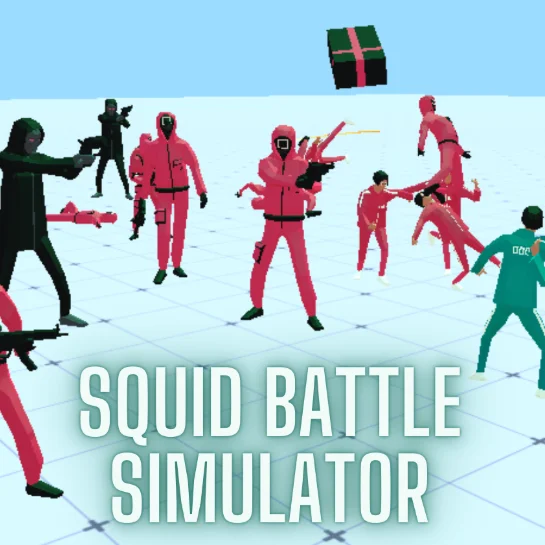












About Squid Battle Simulator
Squid Battle Simulator is a single-player strategy game inspired by the characters and visual themes associated with Squid Game. Instead of controlling one fighter directly, you become the commander of an entire army.
Each level presents an enemy formation that you must defeat. Before the fight begins, you select units and place them on your side of the battlefield. Once your formation is ready, start the simulation and watch both armies fight automatically.
Victory depends on the choices you make during the preparation phase. A large army is not always an effective one. Unit roles, deployment positions, attack range, durability, and the available budget all influence the result.
The game runs directly in a web browser using 3D WebGL technology. Its mouse-and-keyboard interface is designed for desktop play, giving you enough control to inspect the arena and arrange units accurately.
How to Play Squid Battle Simulator
Every level begins with a planning phase. Inspect the opposing army before spending your available resources.
Follow this process to prepare for battle:
- Examine the number and position of enemy units.
- Review the fighters available for the current level.
- Select units that can counter the enemy formation.
- Place durable fighters near the front of your army.
- Keep vulnerable ranged units farther from immediate danger.
- Adjust or remove units if your formation exceeds the budget.
- Start the battle and observe how the two armies interact.
- Change your composition or positioning if your army loses.
Combat plays out automatically after the simulation starts. You cannot repair a poor formation in the middle of the fight, so every important decision must be made beforehand.
Controls
Squid Battle Simulator uses the mouse and keyboard to deploy units and inspect the 3D battlefield:
Some hosted versions display slightly different mouse-button assignments. Check the control panel next to the game before placing your first unit.
Units, Budget, and Battle Formations
The central challenge is building an army that fits the available budget while still answering the enemy’s strengths.
Expensive units may be stronger individually, but purchasing only costly fighters can leave your formation too small. Cheap units provide greater numbers, although they may fall quickly against powerful opponents.
Positioning is equally important. If every unit is placed in one tight group, the army may become trapped or overwhelmed. A layered formation allows the frontline to delay the enemy while the remaining units attack from safer positions.
Beginner Tips for Squid Battle Simulator
Study the enemy before deploying anything. Their formation provides clues about the units and positions you should use.
Protect ranged fighters. Placing them on the front line wastes their advantage and allows enemies to eliminate them quickly.
Build a balanced army. Combine units that can withstand damage with fighters capable of dealing consistent attacks.
Do not place every soldier in one row. Multiple lines give your army more time to attack as enemies advance.
Use the entire deployment area. Wider spacing can prevent the opposing army from surrounding all your units at once.
Watch every lost battle carefully. Notice which unit falls first and where the enemy breaks through your formation.
Remove ineffective units rather than restarting immediately. Small deployment changes can completely alter the outcome.
Advanced Squid Battle Simulator Strategy
Control enemy movement through positioning. Place frontline units where they can draw opponents away from your most valuable attackers.
Create multiple layers. A durable first line absorbs the initial charge, a second group reinforces weak areas, and ranged units attack from behind both layers.
Avoid automatic symmetry. The best formation is not always evenly arranged. If the enemy has concentrated most of its power on one side, strengthen that part of your army or use the opposite side to create a favorable attack angle.
Test one change at a time after losing. Replacing the entire army makes it difficult to determine why a new strategy succeeds or fails. Moving one unit or changing one role often provides clearer information.
Evaluate cost efficiency. A powerful unit is only worthwhile if it survives long enough to influence the battle. Several affordable fighters may produce better results by surrounding a single expensive opponent.
Use sacrificial units deliberately. A low-cost fighter can distract a dangerous enemy while your stronger units attack from another direction.
Observe target selection during combat. Learning which enemies your troops engage first will help you predict future battles and design more reliable formations.
FAQ
Is Squid Battle Simulator free to play?
Yes. You can play the game online for free through a compatible web browser.
Do I need to download the game?
No. Squid Battle Simulator runs directly in the browser without requiring a separate installation.
Do I control the soldiers during combat?
No. You select and position your units before the battle. The fight proceeds automatically after you start the simulation.
How do I win a level?
Eliminate the opposing army before all of your units are defeated. Choosing the right fighters and arranging them effectively are the keys to victory.
Why can’t I place more units?
Each level gives you a limited deployment budget. If you cannot add another fighter, remove a unit or choose a less expensive option.
Can I remove a unit before battle?
Yes. Use the indicated delete command to remove a deployed fighter and recover space in your formation.
What should I do if my ranged units are defeated early?
Move them farther behind your frontline and place durable units between them and the enemy.
Is Squid Battle Simulator a multiplayer game?
No. The standard browser version is a single-player battle simulation game.
Who developed Squid Battle Simulator?
Squid Battle Simulator was developed by GoGoMan and released as a browser-based WebGL game.
More Games Like This

Idle Ants
Idle Breakout

Idle Dice

Idle Shark

Idle Success

Revolution Idle

BitLife Life Simulator Game

Farm Match Seasons

Raccoon Adventure City Simulator 3D

Minecraft Case Simulator
Idle Dices