









About Raccoon Adventure City Simulator 3D
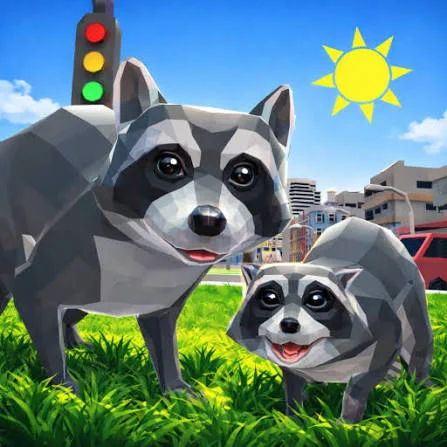
Raccoon Adventure City Simulator 3D is an open-world animal simulation game developed by CyberGoldfinch. You take control of a small raccoon and explore two contrasting environments: a busy urban area filled with buildings and useful objects, and a forest inhabited by potentially dangerous animals.
Survival is an important part of the adventure. Your raccoon needs food, must remain healthy, and should avoid powerful predators until it becomes strong enough to fight them. Exploration leads to missions offered by other raccoons, collectibles hidden around the world, and opportunities to earn experience and coins.
Progress extends beyond the main character. You can develop the raccoon’s abilities, improve its home, find a partner, and create a family. These role-playing elements give you long-term goals while the open environment provides space for unrestricted exploration.
The Unity WebGL version runs directly in a compatible desktop browser. Its third-person controls resemble a traditional computer adventure game, combining keyboard movement with mouse-based combat and interface navigation.
How to Play Raccoon Adventure City Simulator 3D
Begin by learning how to walk, run, jump, sneak, and roll. Once you can move comfortably, explore the nearby area and locate other raccoons with quests or dialogue markers.
Missions may require you to collect objects, find food, travel to a particular location, or confront hostile animals. Complete these objectives to earn coins and experience. Experience helps your raccoon grow stronger, while coins can support character development, family progress, and improvements to your home.
The main gameplay loop follows this pattern:
- Explore the city and nearby forest.
- Speak to raccoons offering quests.
- Collect food, useful objects, coins, and experience.
- Complete mission objectives.
- Avoid or fight hostile animals.
- Return to claim rewards when required.
- Improve the raccoon and its home.
- Find a partner and expand the family.
- Unlock harder missions and explore more dangerous areas.
Watch the raccoon’s condition during every journey. Food can restore health, and some items can be carried for later use. Do not enter a difficult fight simply because an enemy is nearby; avoiding danger is often the better early-game decision.
Raccoon Adventure City Simulator 3D Controls
Use the following desktop browser controls:
Some hosted editions may also recognize Ctrl as an attack input. Follow the prompts displayed by the version loaded on the website if its control mapping differs.
Running, sneaking, and rolling are not merely visual actions. Sprinting helps you cross open spaces or escape predators, while sneaking makes it easier to approach a location without immediately attracting attention.
Quests, Survival, Family, and Character Progression
The game combines several systems rather than focusing entirely on free exploration.
The city and forest require different approaches. Urban areas contain buildings, rooftops, streets, food, and objects that can help with missions. The forest offers more open terrain but also contains wolves and other predators.
Helping other raccoons is central to development. Quests provide the resources needed to become stronger, so aimless exploration alone may not unlock all available content.
Family members also require attention. Once you have a partner or offspring, gather enough food and resources to support the whole group rather than spending everything on the main character.
Beginner Tips for Raccoon Adventure City Simulator 3D
Complete nearby introductory quests first. They provide safer experience and teach you where important locations can be found.
Collect food whenever possible. If the raccoon is already healthy, save available food for later instead of entering a dangerous area unprepared.
Avoid strong predators early in the game. Wolves and other hostile animals can defeat an undeveloped raccoon quickly.
Use sneak mode before approaching an unknown animal. This gives you more time to evaluate the danger and may help you secure the first attack.
Save some stamina for escape. Do not sprint continuously when entering the forest, because you may need to run away from a predator.
Search around buildings for alternative routes. Crates, fences, dumpsters, slopes, and other objects can provide access to rooftops or elevated mission items.
Follow quest information carefully. If an object appears impossible to find, recheck the marked area and inspect different heights rather than searching the entire map.
Return home regularly. The den is an important progression location, especially after you begin improving it or building a family.
Advanced Raccoon Adventure Strategy
Group nearby objectives together. Before crossing the map, check whether several quests or collectibles are located in the same area. Completing them in one journey saves travel time and reduces exposure to predators.
Fight selectively. Experience from combat can be useful, but unnecessary battles consume health and time. Prioritize enemies connected to an active mission or blocking access to a valuable area.
Use terrain to control encounters. Narrow paths, fences, corners, and elevated surfaces can prevent multiple hostile animals from surrounding the raccoon. Avoid fighting in large open areas when several predators are nearby.
Approach difficult targets while sneaking. Landing the first attack improves your chances against a stronger opponent and gives you the option to retreat before becoming trapped.
Master jump and roll movement. Some collectibles and mission objects are placed above street level. Instead of attempting to climb a vertical wall, look for a sequence of lower objects that forms a practical route upward.
Invest in improvements that solve your current weakness. If combat is stopping quest progress, strengthen the character. If family maintenance is consuming resources, focus on reliable food and coin collection.
Keep reserve food before a long expedition. Returning home after every encounter is inefficient, while carrying recovery items lets you complete several tasks in one trip.
Learn the boundary between city and forest threats. Use the safer urban area to collect resources and build strength before repeatedly challenging the most dangerous forest locations.
FAQ
What is Raccoon Adventure City Simulator 3D?
It is a third-person animal simulation and adventure game in which you explore a city and forest as a raccoon, complete quests, collect resources, fight predators, and develop a family.
Who developed the game?
Raccoon Adventure City Simulator 3D was developed by CyberGoldfinch, a studio known for animal simulation games.
Can I play it in a web browser?
Yes. The Unity WebGL edition is designed for compatible desktop browsers and does not require a separate game installation.
How do I attack another animal?
Approach the target and press the left mouse button. Some hosted versions may also support Ctrl. Monitor your health and retreat if the enemy is too strong.
How do I restore the raccoon’s health?
Find and eat food while exploring. When possible, keep extra food available before traveling into dangerous areas.
What is sneaking used for?
Press C to activate or deactivate sneaking. It helps you approach enemies more carefully and reduces the risk of rushing directly into a dangerous encounter.
How do I become stronger?
Complete quests, earn experience, collect coins, and use the available character and home improvement systems. Avoid high-level predators until your raccoon has developed.
Can the raccoon have a family?
Yes. Family progression is one of the game’s long-term features. You can find a partner and eventually raise offspring, but family members also need food and support.
Why can’t I reach an item on a roof?
Look for crates, fences, dumpsters, slopes, or lower sections of the building. The best route is usually a sequence of jumps rather than climbing a vertical wall directly.
What is the difference between the city and the forest?
The city contains buildings, roads, food, collectibles, and mission locations. The forest offers additional exploration but contains more predators and dangerous encounters.
Is the game multiplayer?
No. Raccoon Adventure City Simulator 3D is primarily a single-player browser adventure.
More Games Like This

Idle Bee Factory

Poop Clicker Flash

Idle Zoo Safari Rescue

Idle Ants

Idle Shark

LTF Idle

Farm Match Seasons

Andy’s Apple Farm
Ant Art Tycoon
Chicky Farm
Orb Farm